
This is a repost from my blog.
For the last recent years, my designer’s job was closely related to the design of complex game controls. Surprisingly, it was quite hard for me to find good general guidelines. I had to solve some pretty complicated design challenges and study a lot of different sources until I was able to develop some principles that I currently use in my job. I think that they’re worth sharing and might be useful for anyone who’s dealing with controls design tasks.
The topic overall is, perhaps, too big for just one article, so I’ll also be giving external links to other resources with more details when it’s possible.
So, I would define the three main principles:
Accessibility – the game controls should be easy to learn and use, and take into account human’s physical and cognitive limitations.
Intent Communication – the game controls should communicate the player’s intent in a way the player expects and create a feeling of full control.
Expression Space – the game controls should give the player enough expression space for mastery, and keep the sufficient level of variety.
Let’s look at these principles in more details.
Accessibility
Hand Limitations
If we want our controls to be easy to use, the first thing that we need to take into account is our hand limitations.
There are three main “finger groups” that we need to keep in mind during controls design:
Primary control – thumb & index fingers. Flexible and precise, usable for primary actions (shoot, jump, etc.).
Secondary control – middle finger. Flexible but not so precise, usable for primary hold actions (aiming mode, [w] for walking, etc.).
Support – ring & pinkie fingers. Weak and not very flexible, can be used for secondary actions.
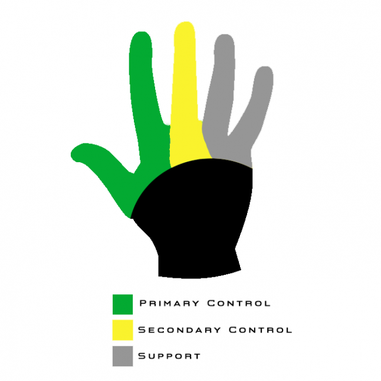
Let’s try to apply our knowledge of hands limitations for the more practical task – designing of the game controls layout. In order to do that, we can use a Fitt’s Law, which for our case we can formulate that way: “the fewer the distance to the button and the bigger the button, the more accessible the button is.”
Combining Fitt’s Law and knowledge of hand limitations, we can formulate the basic principle for controls layout design:
The most frequent actions should be in the most accessible places and match primary control group of the player’s hand.
Accessibility Tiers: Gamepad
For the gamepad, it might look like this (as an example, we can use very common Xbox 360 Controller):
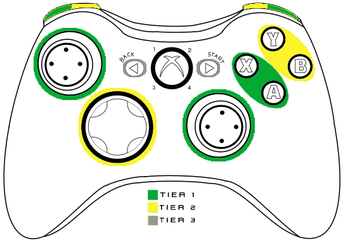
Tier 1 | Tier 2 | Tier 3 |
|---|---|---|
A/X buttons | B/Y | Start/Back |
Sticks | DPAD |
Accessibility Tiers: Keyboard & Mouse
For the keyboard, I would divide them this way (it’s also was my internal guideline for Watch Dogs 2 PC controls layout):
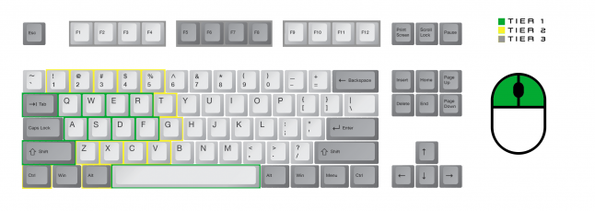
Tier 1 | Tier 2 | Tier 3 |
|---|---|---|
WASD + Q/E/R/F | Numerical keys 1-5 | F1-F12 |
Space/Shift/Tab | Z/X/C/V/T/G | Right side of the keyboard according to the Fitt’s Law (the shortest finger trajectories) |
LMB/RMB/MMB | Ctrl/Alt | Any action that requires to move the hand |
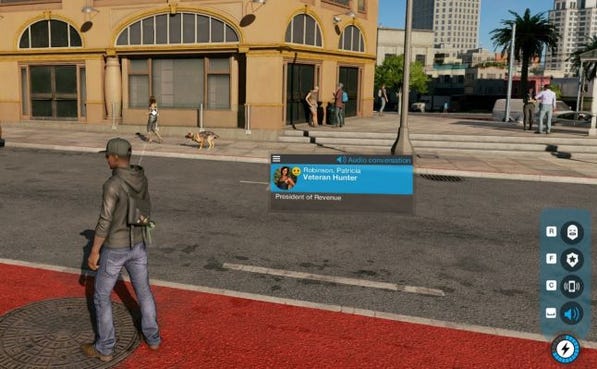
As a small practical example, we can look at the keyboard hacking interface for Watch Dogs 2 PC.
Here’s how it looks like with the gamepad – all the buttons can be accessed with the right hand thumb, and to activate the “hacking mode” the player should hold LB button with the left hand index finger. Such controls layout allows to use the hacking simultaneously with character movement as fast contextual actions.
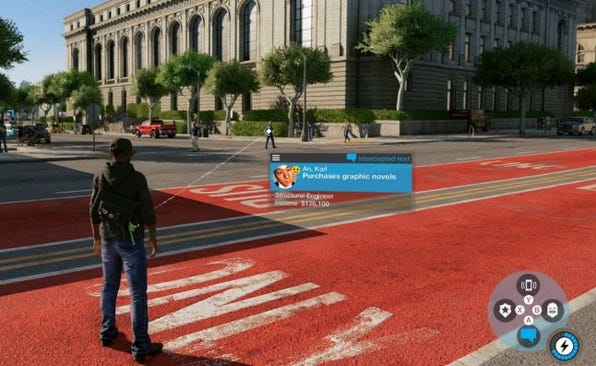
On the keyboard, hacking actions are in places with the fastest access with thumb and index fingers (R, F, C, Space), and “hacking mode” can be activated with the mouse (which makes hacking more precise than the gamepad controls). The final playest result for such control scheme was 4,7 out of 5.
Attention Limit
There’s always human attention limit for a number of simultaneous actions, even if they’re physically possible (for example, it’s and extremely hard to simultaneously drive the car, control the acceleration level, and also aim and shoot – even if your gamepad physically allows this).
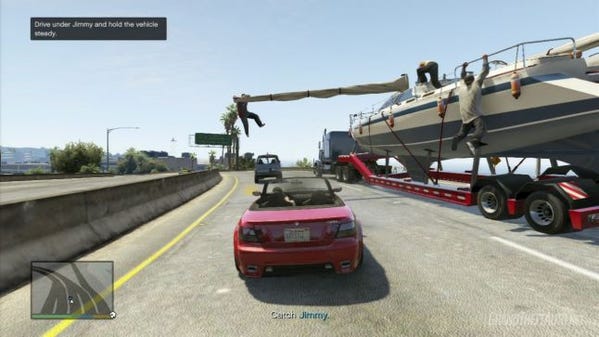
Of course, there are different types of actions, with different attention demands. I would divide them this way:
Primary actions – require active decision-making, the main “Verbs”/basic mechanics that the player use. Might include more than one basic inputs (aim & shoot, moving & jumping, etc.). Require constant attention from the player.
State change – actions that switch control modes (hold button to aim, hold the button to run, etc.). Slightly increase the overal