
When time is running out, the team is frazzled, and mysterious problems arise, sometimes unconventional solutions are needed. When you’ve just got to get the thing done, all bets are off. In a pair of classic articles originally published in our sister publication Game Developer magazine, we explored some fascinating real-life examples of just that. You can read those timeless pieces here and here.
Gamasutra decided to revisit the topic. We’ve gathered unusual solutions to unusual problems from across the industry. Those who submitted may not all be proud of these “fixes,” but perhaps they should be. They got the game out the door, they didn’t break anything, and more importantly, nobody noticed. At least… not until now.
Delight at the ingenuity, marvel at the audaciousness, learn from the mistakes of your predecessors, but most importantly, release games that work—on time, too.
If you want to share your own surprising solutions for getting games out the door, we want to hear them! Send your dirty tricks to Gamasutra (with "dirty coding tricks" in the subject line) and they may be featured in a future article.
The time Super Time Force ran out of batteries
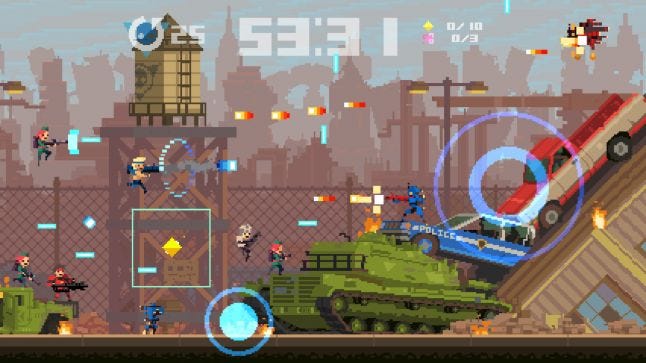
"Instead of re-balancing level files and buffer sizes across the game, we had an easier idea: when you were nearing the rewind memory limit we simply paused the game, flashed a big fat 'low battery' icon on the screen and gracefully booted you to the level select menu."
It may not look like it, but Super Time Force pushed the Xbox 360's memory limits to the brink. With time-rewinding, we had to store all the information of every active object in the level, for every moment in time, for the entire duration of the rewindable timeline. Every additional player, enemy, bullet, explosion, platform, chunk of debris, and dismembered body part eats into the rewind memory, and managing this became the bane of the entire development.
In the final stretch of certification, with every level and rewind buffer painstakingly tweaked to perfect balance, we got a new bug from QA:
"Start any level. Press every button on the controller as fast as possible for 2 minutes. Rewind and do this 20 more times. Out of memory."
Extreme button spamming would eat into the rewind memory faster than what was anticipated for human inputs. Rather than go back to square one with a full re-balance of level files and buffer sizes, we opted for a simpler solution: detect extended periods of unreasonably fast button spamming and immediately self-destruct the player, then rewind them back to the start. We “pretended” that the player accidentally triggered a rewind during their, undoubtedly, furious controller mashing. This bug was now a feature.
A few days later we get another bug report:
"Start 199X level 2. Run through the level blowing everything up and leaving as much debris as possible while continuously shooting machine gun bullets until time runs out. Rewind and do this 20 more times. Out of memory."
The rewind memory limit could be reached in the obscenely rare case of enough bullets and explosions triggering all of the debris at once in this particular level. Again, instead of re-balancing level files and buffer sizes across the game, we had an easier idea: when you were nearing the rewind memory limit we simply paused the game, flashed a big fat "low battery" icon on the screen and gracefully booted you to the level select menu.
No, your controller was not really low on batteries. No, we never explained this to anyone. Yes, QA accepted this fix and we passed certification.
Kenneth Yeung
Technical Director, Capy Games
The extra tachometer
I was the lead programmer on the PS2 & PSP versions of a racing game, developed in parallel with the PS3 and 360 versions.
QA complained that the car handing was subtly different from the other versions of the game. It just didn’t feel quite right. We couldn't find any problem, so we invited one of the testers to our office to discuss the issue. He played the game there and confirmed that the problem did not occur in our office, though it did occur in the QA build.
"We spent a couple of weeks, on and off, trying to track down the cause of this problem. But we could find no cause or fix. It was during this last test, on the eve of submission, that we realized the solution to the problem – if not the cause. "
We started to try to narrow down the differences between the QA build and our development build. After some testing, we found that the difference in handling was related to the frame-rate counter that we were printing in the corner of the screen in our dev build. With this disabled, as in the (master) build we supplied to QA, the handling did indeed feel slightly different. Better, in fact. We spent some time blind testing (covering up the frame-rate counter, switching it on and off) to convince ourselves that this was the case. The difference was subtle, and difficult to pin down exactly. But it was clear – printing the frame-rate “fixed” the handling issue.
We spent a couple of weeks, on and off, trying to track down the cause of this problem. We inspected the physics code, which was supplied by the team working on the other versions of the game, looking for uninitialized variables (which could be affected by the stack state left behind by the font print routine) or possible timing issues. We tried initializing memory. But we could find no cause or fix.
As a last resort we investigated whether moving the frame rate counter around the screen affected the car's handling. It didn't seem to matter where the frame rate was printed, or even whether it was on or off the screen, for the fix to be effective.
It was during this last test, on the eve of submission, that we realized the solution to the problem – if not the cause. We shipped the game with the debug frame-rate counter permanently enabled, printing the frame-rate just off the right hand side of the screen.
Martin Turton
Director, Clever Beans Ltd
Squirreled away
No tags.