
TL;DR: If you're not interested in all the details, check out this Twitter thread highlighting some important features.
Movement on stairs has been the bane of my existence for a long time. I first added it to our old prototype in late 2017 and the code stayed more or less the same up until recently. It was barely good enough for our prototype, and it was never meant to stick around until release.
However, precisely because it has produced so many bugs and highlighted so many pitfalls, I can now tell you what to look out for when designing your own system. I say “designing” because I will talk about game design a lot and address programming only conceptually rather than providing actual code snippets. Otherwise, this already lengthy write-up would definitely grow out of proportion.
Requirements
First, I want to quickly describe what the key features of our movement system are. If yours has completely different requirements, the solutions I am about to lay out my not work for you.
1. The game is a 2D side-scroller allowing the player to walk and sprint. It has no jumping or dashing, meaning that stairs can only be entered at the very top and bottom.
2. Movement on stairs has its own custom animations rather than re-using the ones for regular horizontal walking (and sprinting).
3. There are two types of stairs: frontal (vertical) and side (diagonal) stairs. The latter can descend (top left to bottom right) or ascend (bottom left to top right).
4. All steps have the same size to fit the player’s animations. Stairs can be any length.
5. Our player model’s collider (relevant to stairs movement) is around the thighs. However, this is not a requirement for most of this to work on a conceptual level.
6. We don't have any combat or other factors that might apply forces on the player while moving on stairs.
7. The goal is to create intuitive, bug-resistant, and good-looking stairs movement.
With all that out of the way, let’s iterate and solve problems as they pop up! We’ll start with side (i.e. diagonal) stairs; as you will see, most of the rules we’re about to set up apply to frontal (i.e. vertical) stairs as well.
Part 1: Getting on the stairs
The first thing we’re trying to do is get the player on the stairs. Let’s create the very basic iteration 1 of our stairs: When the player is about to pass by the stairs, they hit a collider (we’ll name “bypass check”) that switches them to stairs controls. Place another bypass check at the other end of the stairs and switch back to normal controls.
 The player collider is shown in green, the bypass check is blue.
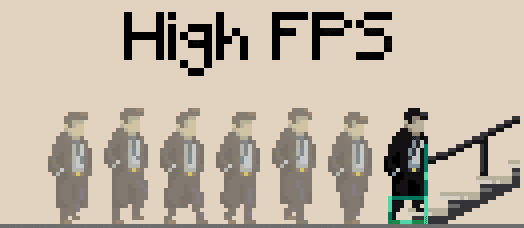
The first problem we're going to solve might appear exotic at first, but you will run into it, so let's get it out of the way right now: The player might not hit the collider at the right moment, especially at a low frame rate if your player movement speed is FPS-independent (which it definitely should be). With fewer frames per second, the walking distance between frames increases, and the higher it gets, the more the player will overshoot.
At high FPS, the player will hit the collider just as they get in range:
However, at low FPS, they they may hit the bypass check with just the back of their collider:
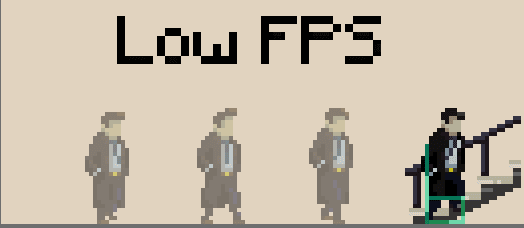
This will cause the walk animation not to fit the stairs sprite. That is why, in iteration 2, we simply teleport the player to the right position when starting (“entry point”) or ending (“exit point”) movement on stairs. Since the teleport distance is only bigger at low FPS, when the game is already choppy, the teleport won't be noticeable.
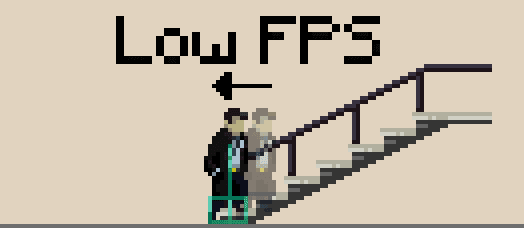
The arrow illustrates a movement from one frame to the next.
So far, so good. But what if the player wants to be able to walk past the stairs? So far, the player will always enter them once they touch one of its colliders.
To solve this in iteration 3, let’s start by defining a different collider (called “entry range”) around the start of the stairs. Only when pressing up (at the bottom) or down (at the top) will the player start walking up or down the stairs. Moving left and right makes them walk past the entry points, and they continue with their regular horizontal movement.
The problem now is that once the player starts pressing up or down inside the entry range, teleporting to the starting position looks way too obvious because the collider is so wide:
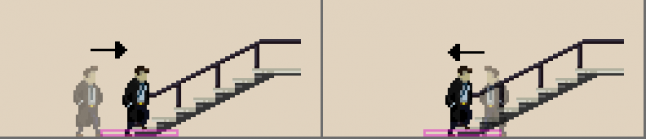 To solve this in iteration 4, we make the character walk to the actual entry point while the player holds up or down inside the entry range. E.g. if the player is right of the entry point at the bottom of the stairs, holding up will cause the character to walk to the entry point first before they enter the stairs. For this to work, we need to add some conditional extra controls to our regular movement controls that only apply within entry range.
 Arrows in squares show which button the player is currently pressing.
Now of course we got rid of the teleporting and, as a result, we’ve again lost control over where exactly the player enters the stairs, so the animation looks off. That is why, in iteration 5, we combine entry range and bypass check! However, the latter needs to be upgraded now that the player can approach the stairs from both sides. It needs to dynamically switch to the opposite side of the stairs’ entry point, so the player is just in the right position when they hit it.
The combination ultimately works like this: If the player is within entry range and holds up/down, they move towards the entry point, and then when they hit the bypass check, they start moving on the stairs.
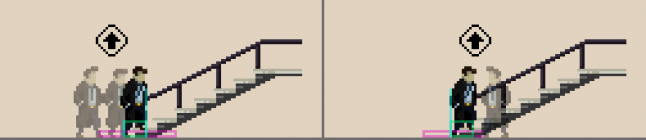 Note: The bypass check always switches to the opposite side of the player.
Now the player can walk past the entry point of all our stairs. But what if the stairs are the only way to progress to the left or right? What if we sometimes want them the way they were in iteration 1, forcing the player to enter if they hold left or right towards the stairs?
In iteration 6, we distinguish between two types of stairs entry points (“bypassable” and “non-bypassable”). To that end, let’s add a boolean called “bypassable” that we can set individually for each end of each stairs object. If an entry point is not bypassable, the bypass check collider no longer dynamically switches sides because the entry point can only be approached from one side. Instead, the collider is always fixed to the opposite, unreachable side of the approaching player.
We have to make sure to account for every possible button or combination of buttons the player may use to express their intent to enter the different types of stairs entry points. Up (at the bottom) and down (at the top) already work on all stairs. However, when approaching non-bypassable stairs from the left, pressing right also expresses the intent to enter the stairs (and vice versa) because moving past them is not allowed. Now when hitting a bypass check, the player will be put on the stairs only if they are currently pressing one of the buttons specific to the current case.
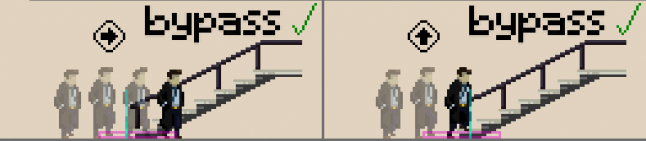 If the stairs in this example are bypassable, the player must hold up to enter them, or left/right to walk past them.
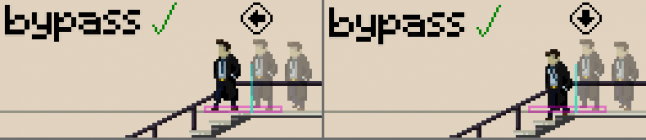 The same goes on top of bypassable stairs.
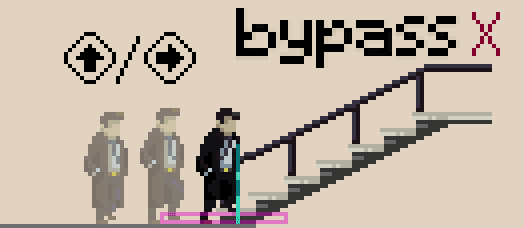
If they are not bypassable, holding right or up will both be interpreted as the player intending to enter the stairs.
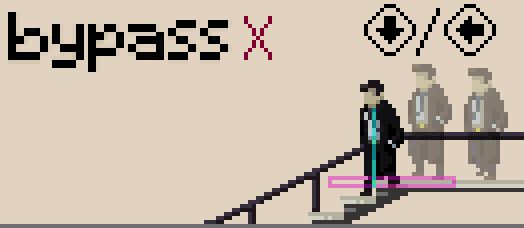
The same goes on top of non-bypassable stairs.
Depending on the exact implementation of our controls, we may have just created a different set of problems by giving the player the ability of pressing so many different buttons near the stairs to walk towards them.
To fix them in iteration 7, we need to define which buttons cancel each other out at the entry points of the different types of stairs and which ones must not add their movement speeds up with one another. We also need to set the animations accordingly, e.g. if two buttons cancel each other out (if the player is holding left and right, for example), the player model should not walk in place. To account for all the possible problems, it is important to distinguish between ascending stairs (bottom left to top right) and descending stairs (top left to bottom right). For instance, a player standing in the range of descending stairs might cause a “walk in place” animation by holding left (away from the stairs) and down (which, remember, counts as towards the stairs in this case). Or they might hold down (towards the stairs) and right (also towards the stairs) for twice the movement speed. We have to account for all different cases of all different button combinations on all types of stairs to make sure that doesn’t cause any problems. Maybe you have a clever system that does this for you already or you're like me and you manually define a bunch of boolean combinations outside the actual movement logic.
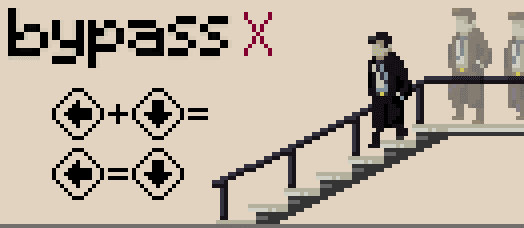
Holding left, holding down, and holding left + down should all yield the same result in this situation.
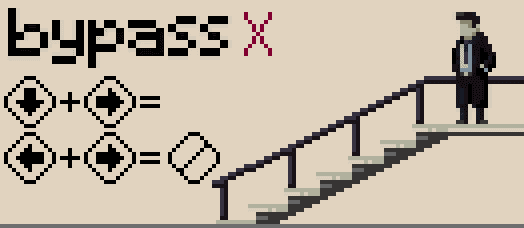
Down + right and left + right both contradict each other. Holding these combinations causes the player to stop.
I urge you not to be lazy about this step and to cover all your bases, both to prevent bugs and make the movement as intuitive as possible.
Alright. Getting on side stairs works fine now. Are there special rules for frontal stairs?
We actually only need to make a few small adjustments to add frontal stairs in iteration 8, as the basic logic works the same. We made it so only a pre-defined line on frontal stairs can actually be used rather than their whole surface. As a result, they have two clearly defined entry points, just like side stairs. This also means that the player can always walk past frontal stairs, i.e. both their top and bottom are bypassable, because the width of the stairs sprite is always wider than the entry range. In some cases, of course, the player may walk past frontal stairs and bump right into a wall which then stops them anyway. The rest (about getting on the stairs) works exactly the same. Even better, we don't ever need to account for the player trying to get up frontal stairs by pressing left or right.
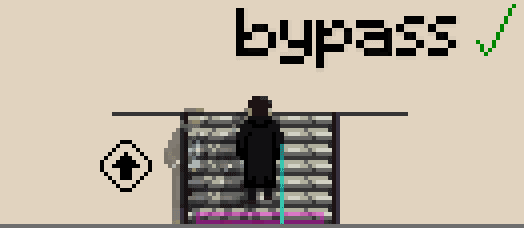
Holding up within entry range causes the player to walk to the entry point and then start walking up the stairs.